The Best Family Calendar Apps in 2026
Nine apps and displays that keep a family on the same schedule, compared honestly by a real one. There’s no single winner, so we picked the best for each kind of family instead.
There’s no one best family calendar app. The right pick depends on the screen you want it on. For a free shared calendar on everyone’s phones, Cozi or Google Calendar. For a dedicated wall touchscreen you’re happy to buy, Skylight or Hearth. For turning school-email chaos into a calendar, Maple. And for the big shared screen your family already walks past (the living-room TV), with kids running their own routines and chores, Luana.
Every option at a glance
Grouped by what kind of thing it is: an app for a screen you own, a device you buy, a phone app, or a build-it-yourself dashboard.
PRICES VERIFIED JULY 2026 AND CAN CHANGE · CHECK EACH COMPANY’S SITE
How to choose the right one
The category splits cleanly once you answer one question: which screen do you want the calendar to live on?
What each one is best for
Every product here is good at something. Here’s the lane each one genuinely owns, and what to keep in mind before you pick it.
Luana
OUR APPAn app that turns the smart TV you already own into a shared family calendar, with kids’ morning and evening routines and a star-reward chore chart they run from the remote. Managed from a phone and web app.
BEST FOR The big shared screen your family already walks past.
KEEP IN MIND It lives on your TV and phone, not a separate wall panel. If you specifically want a dedicated screen mounted in the kitchen, a hardware display does that instead.
The no-hardware way to get a real family command center on the screen that’s already in the room.
Mango Display
TV APPSoftware that puts a calendar dashboard on a TV, tablet, or Echo Show you already have. Calendar-first, lighter on the kids’ routines-and-rewards side.
BEST FOR A budget way to show a calendar on a screen you own.
KEEP IN MIND It’s mainly a display: strong at showing the calendar, thinner on kid check-off and star rewards.
The closest like-for-like to Luana on price; pick it if you mostly want the calendar on a screen and less of the kids’ routine system.
Skylight Calendar
HARDWARE DISPLAYA physical touchscreen calendar you mount on the wall, with a companion app and an optional subscription that unlocks chores and premium features.
BEST FOR A polished, dedicated wall touchscreen.
KEEP IN MIND You buy the hardware up front, and the best features sit behind Skylight Plus. It’s a separate device, not your TV.
The category’s most polished dedicated screen, if you want a standalone panel and will pay for the hardware plus a subscription.
Hearth
HARDWARE DISPLAYA large 27" wall-mounted touchscreen designed with child-development input, centered on morning and evening routines and habits, with a subscription on top.
BEST FOR A premium display built around kids’ routines.
KEEP IN MIND It’s the priciest hardware here and needs the subscription too. Big, beautiful, and a real commitment.
The premium routines-first display, if budget is no object and you want the biggest dedicated screen.
Cozyla & ApoloSign
HARDWARE FRAMEAll-in-one digital calendar frames you buy once. The pitch is owning the device outright rather than paying a monthly display subscription.
BEST FOR Buy-once calendar frames with no required subscription.
KEEP IN MIND Software and family features are lighter than the subscription players, and some add-ons (AI, extras) still cost more.
For buyers who’d rather own a frame outright than subscribe, and don’t need deep kids’ routines.
Cozi
PHONE / WEB APPThe long-running shared family calendar app: a color-coded calendar plus shopping and to-do lists, free with an ad-supported tier and a paid Gold upgrade.
BEST FOR The proven, free, simple shared phone calendar + lists.
KEEP IN MIND It lives on phones, so it only helps when someone opens it. No ambient shared screen, and no star-reward system for kids.
The safe free default for a phone-first family that just wants one shared calendar and lists.
Maple
PHONE / DESKTOP APPA phone and desktop “family operating system” that uses AI to pull school and activity emails into a shared calendar, plus tasks and meal planning.
BEST FOR Turning school emails into calendar events.
KEEP IN MIND It doesn’t run on your TV, so there’s no big shared in-room screen, and the kids’ side is tasks rather than routines with rewards.
Best if your pain is inbox overload from school emails and you want AI to sort it into the calendar.
Google Calendar
PHONE / WEB APPThe calendar most families already use. Share a calendar with your partner and it syncs across every device for nothing.
BEST FOR Free and already in your pocket.
KEEP IN MIND It’s a personal calendar, not a family display: no shared in-room screen, no kids’ routines, no rewards.
Unbeatable for free and universal sync; most apps here (Luana included) sync from it rather than replace it.
DAKboard
DIY DASHBOARDA build-it-yourself dashboard you point a browser or Raspberry Pi at, endlessly customizable, with optional hardware.
BEST FOR Full customization for makers who like to tinker.
KEEP IN MIND You’re the IT department: it’s a display to configure, not something kids interact with, and it takes setup and upkeep.
For tinkerers who want total control and don’t mind maintaining it.
The one lane the others leave open.
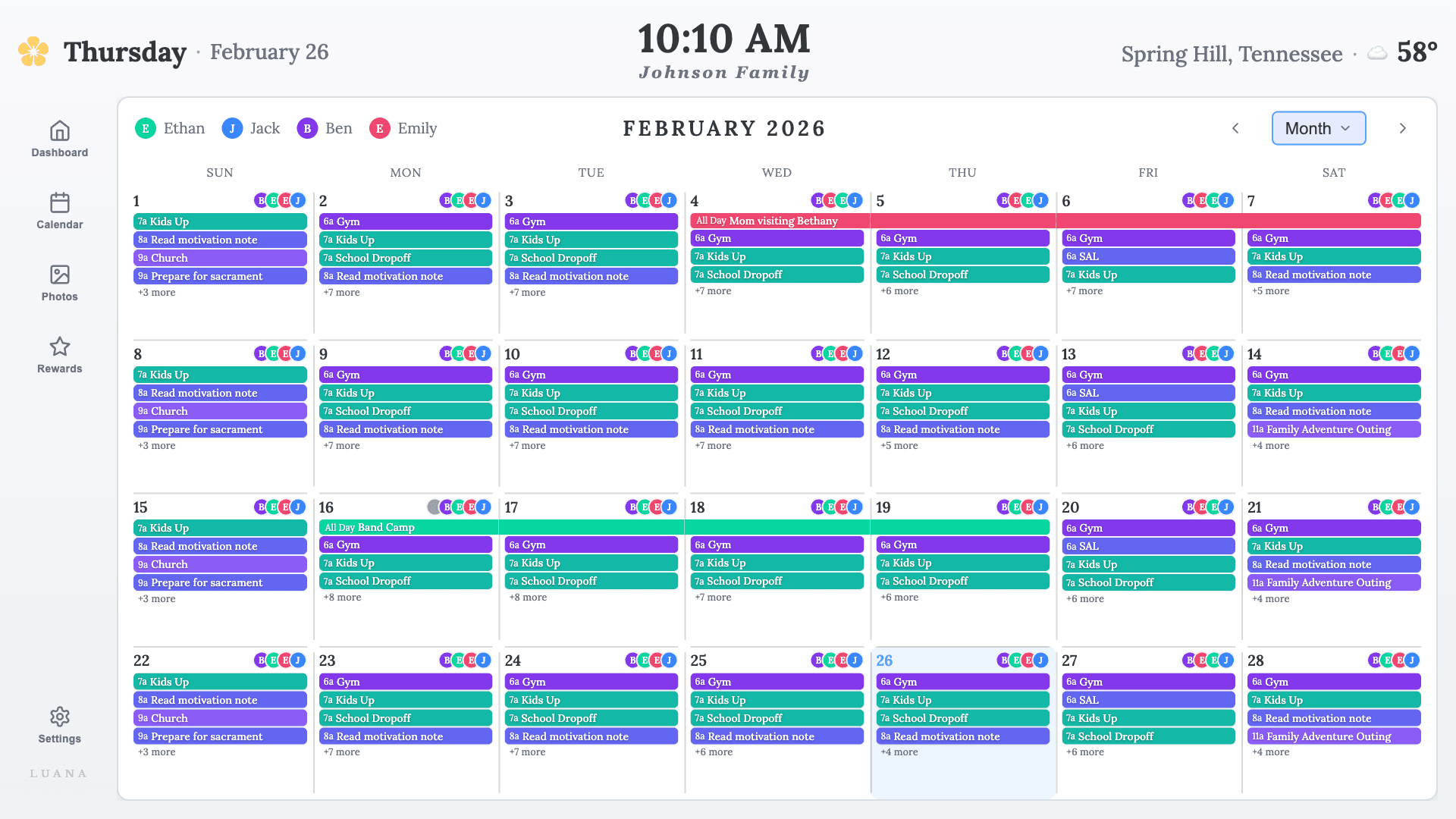
Phone apps live in a pocket. Hardware displays cost hundreds and hang on one wall. Luana puts the shared calendar, kids’ routines, and chore rewards on the biggest screen your family already owns and already walks past (the living-room TV) for $7.99/mo with nothing to buy. It installs from your TV’s app store; it doesn’t cast.
“It’s been an absolute game changer for my family. So much cheaper than buying the other types out there, as this can all work on your TV! It’s helped me as a mom with the mental load too, as I have each day’s chores planned in so the kids know exactly what to expect!”
Every price here was checked against each company’s own site in July 2026 and can change, so confirm before you buy. We named what each product does best instead of crowning one overall winner, because the right pick genuinely depends on your family.
Luana is our app, so treat this as our point of view. We’ve tried to describe the others as fairly as we’d want ours described, and to be clear about the one thing Luana is built for that most of the list isn’t: living on the TV you already own.
Family calendar questions, answered
What is the best family calendar app?
There isn’t one winner. The best family calendar app depends on the screen you want it on. For a free shared calendar on everyone’s phones, Cozi or Google Calendar. For a dedicated wall touchscreen you’re happy to buy, Skylight or Hearth. For turning school-email chaos into a calendar, Maple. For the big shared screen your family already walks past (the living-room TV), with kids running their own routines and chores, Luana.
What is the best free family calendar app?
Google Calendar and Cozi are the two best free options. Google Calendar is already on your phone and syncs everywhere; Cozi adds shared shopping and to-do lists on a free, ad-supported tier. Both live on phones, so they work when someone opens the app rather than as an always-visible family display.
What is the best family calendar to show on a TV?
For the TV you already own, Luana is purpose-built for it: it installs from your TV’s app store (Roku, Fire TV, LG, Google TV), not by casting, and shows a shared calendar, kids’ routines, and chore rewards on the big screen. Mango Display is a lower-cost alternative that shows a calendar on a TV, tablet, or Echo Show.
Is a hardware display like Skylight better than a calendar app?
It depends on whether you want to buy a separate screen. A hardware display (Skylight, Hearth, Cozyla) gives you a dedicated always-on panel, but costs $150–$699 up front and usually a subscription on top. An app like Luana or Mango uses a screen you already own (your TV) for a monthly fee and nothing to buy. Same shared-calendar goal, very different cost and commitment.
What is the best family calendar app for kids’ chores and routines?
Look for reward systems, not just a chore list. Luana runs kids’ morning and evening routines plus a star-reward chore chart on the TV, so kids check tasks off themselves. Cozi has chores and lists but no reward system. Skylight and Hearth include chore features on their hardware. Google Calendar and Maple are calendar/task tools without a kids’ rewards layer.
How much does a family calendar cost?
It ranges widely. Free for Google Calendar and Cozi’s basic tier; about $5.99–$7.99/mo for apps that use a screen you own (Mango Display, Luana); and $150–$699 up front plus a subscription for a dedicated hardware display (Skylight, Hearth). Prices verified July 2026 and can change.
What is the best shared calendar app for a family?
If "shared" means everyone can edit from their phone, Google Calendar is the simplest and free. But the real problem with a calendar you share to phones is that nobody sees it until they open the app. A shared calendar app the family actually looks at needs a shared screen: Luana syncs the calendars you already keep (read-only) onto the TV in the living room, so the schedule is shared by being visible, not just by permission settings.
Is there a color coded calendar app that shows every family member?
Most calendar apps color-code on a phone screen; the difference is where you can read it. Luana gives each family member their own color on a TV-sized month or week view, so you can tell whose practice, whose playdate, and whose early release from across the room. Skylight and Hearth do per-person colors on their wall displays; Cozi and Google Calendar do it on phones.
Want the one that lives on your TV?
Try Luana free for 14 days. You can even preview it in your browser before installing anything on the TV.
Start your free trial