A Digital Family Calendar on the TV You Already Own
The whole family walks past the TV every day. Luana turns it into your shared calendar, kids' routines, and chore rewards, so the schedule stops living in one parent's head. No $300–$699 display to buy.
Start your 14-day free trial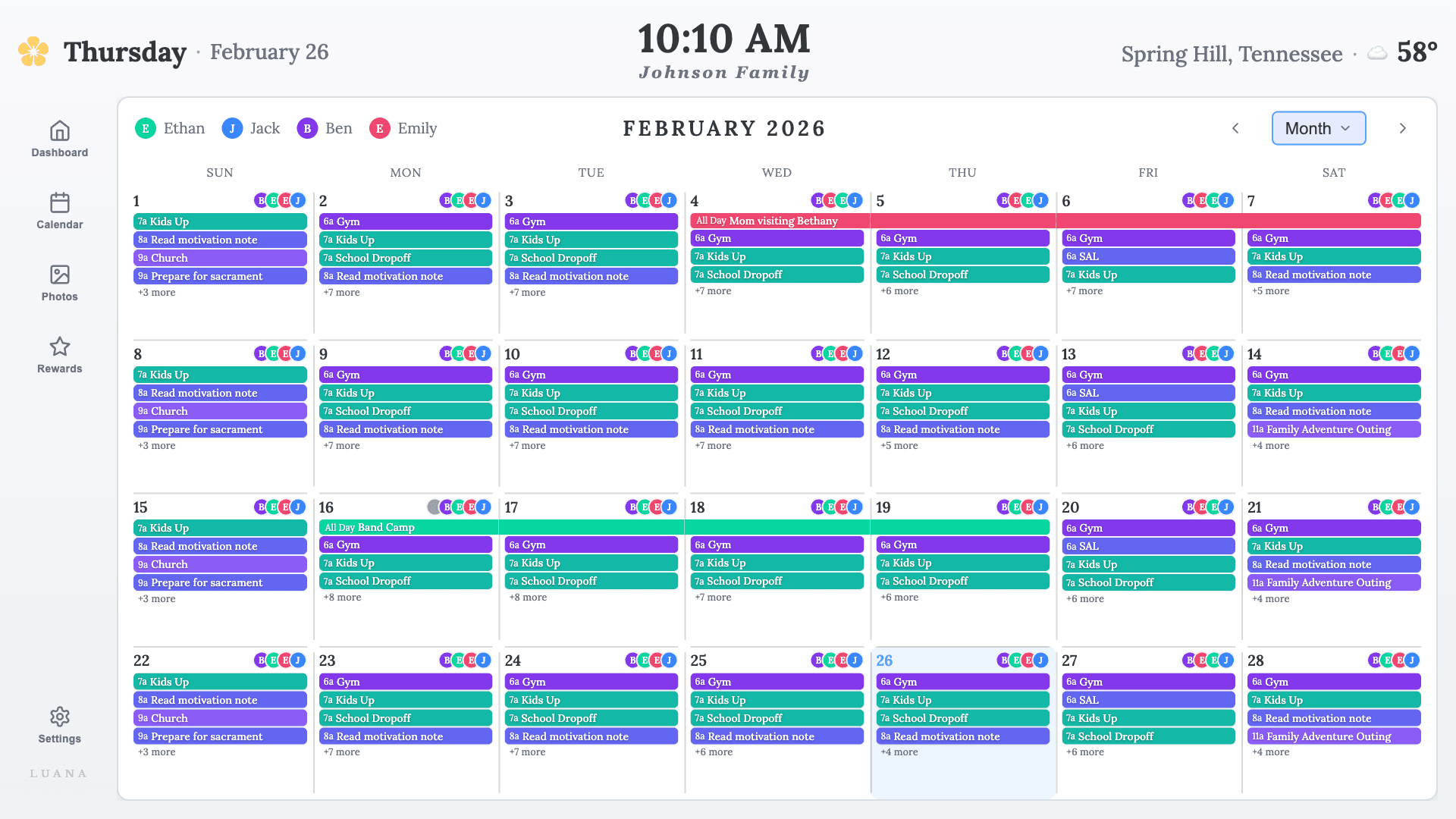
What is a digital family calendar?
It's one shared calendar the whole household can actually see: everyone's events, pulled together on a screen your family already walks past, so nobody has to ask what's happening today. The idea is simple. The question is which screen it lives on, and that decides most of the cost.
The three ways to get one
A dedicated display
Skylight ($300–$600) and Hearth ($699) sell polished wall screens, each with a subscription on top. Great if you want a separate device and don't mind paying for it.
The DIY route
A cast browser tab, a dashboard tool on a Raspberry Pi, or an old tablet on a stand. Genuinely the cheapest if you own the parts and love tinkering. The catch: it's a calendar to look at, not something kids can use, and it breaks (timeouts, logouts, drops).
An app for the TV in your living room
Luana installs from your TV's app store and turns it into a family calendar that's ready the moment anyone picks up the remote. No new hardware, $7.99/mo, 14-day free trial.
COMPETITOR PRICES VERIFIED JULY 2026 AND CAN CHANGE · CHECK EACH COMPANY'S SITE
Weighing more than these three? See our full roundup of the best family calendar apps in 2026, from phone apps to hardware displays.
“It's been an absolute game changer for my family. So much cheaper than buying the other types out there, as this can all work on your TV! It's helped me as a mom with the mental load too, as I have each day's chores planned in so the kids know exactly what to expect!”
What's on the screen
One calendar everyone sees
Google, Apple, and Outlook calendars, synced read-only into a single family view. Luana shows your events and never edits them.
Kids’ routines on the remote
Morning and evening checklists kids mark off themselves, so the "did you brush your teeth?" loop happens between them and the TV. Less nagging for you, and the mental load of who-did-what stops living in your head.
A chore chart that motivates
A chore chart on the TV with star rewards built in. Kids earn stars for the chores and routines they finish, and spend them on treats or privileges you set.
A photo frame when idle
When nobody’s interacting, your family photos take over the screen. The calendar is one press of the remote away.
A family calendar display, without buying the display.
The appeal of a digital wall calendar is that it's big, shared, and right there in the room. Your TV is already all three. Luana makes it the family calendar display for $7.99/mo. A full first year costs less than the cheapest dedicated display's hardware alone, before its subscription is even counted. And if paper works better for a younger kid, print one free with the chore chart generator while the TV handles the calendar.
Questions parents ask
What is a digital family calendar?
A digital family calendar is a shared, always-visible calendar the whole household can see at a glance, usually on a screen in a common area. It pulls everyone’s events into one view so the family runs on the same schedule. Some are dedicated wall devices you buy (Skylight, Hearth); Luana is an app that turns the smart TV you already own into one.
How is this different from a shared Google Calendar on our phones?
A shared phone calendar only works when someone opens it. A family calendar on the TV is ambient: the day is visible in the room where everyone already is, so kids see their own schedule without a device and nobody has to be the household announcer. Luana syncs the calendars you already use, so you keep Google, Apple, or Outlook and gain the big shared screen.
How is this different from a paper wall calendar?
Paper calendars go stale the day someone forgets to write on them. A digital family calendar updates itself from the calendars your family already keeps, shows each person in their own color, and adds things paper cannot do: kids’ routine checklists, chore rewards, and a photo slideshow when it is idle.
Does the calendar stay on all the time?
Luana is designed as an always-on family display. When nobody is interacting, it can show a family photo screensaver, and your day is one press of the remote away. You can also keep using the TV normally; Luana is just another app on it. One exception worth knowing before you buy hardware: on Amazon’s two newest Fire TV sticks, the 4K Select and the 2026 Stick HD, Amazon’s own screensaver takes over after about five minutes and no app can override it. Everything else we support stays up indefinitely, including the Fire TV Stick 4K Plus and 4K Max.
What does a digital family calendar cost?
It depends on the route. A dedicated display runs $300–$699 up front plus a yearly subscription. The DIY route is nearly free if you own the parts, but it only displays a calendar (kids can’t use it) and takes ongoing tinkering to keep alive. Luana is $7.99/mo (or $79.99/yr) with a 14-day free trial and nothing to buy, which makes a full first year cost less than the cheapest dedicated device alone.
Is it only a calendar?
No. Alongside the shared calendar, Luana includes kids’ morning and evening routines they check off from the remote, a chore chart with star rewards, and a family photo screensaver.
See your family's day on your own TV.
Try Luana free for 14 days. You can even preview it in your browser before installing anything.
Start your free trial