The Digital Wall Calendar Already on Your Wall
Skylight, Hearth, and a wave of wall tablets all want to sell your family a new screen for $300–$699. But the biggest, most-glanced-at screen in the house is already mounted: your TV. Luana turns it into your family's wall calendar.
Start your 14-day free trial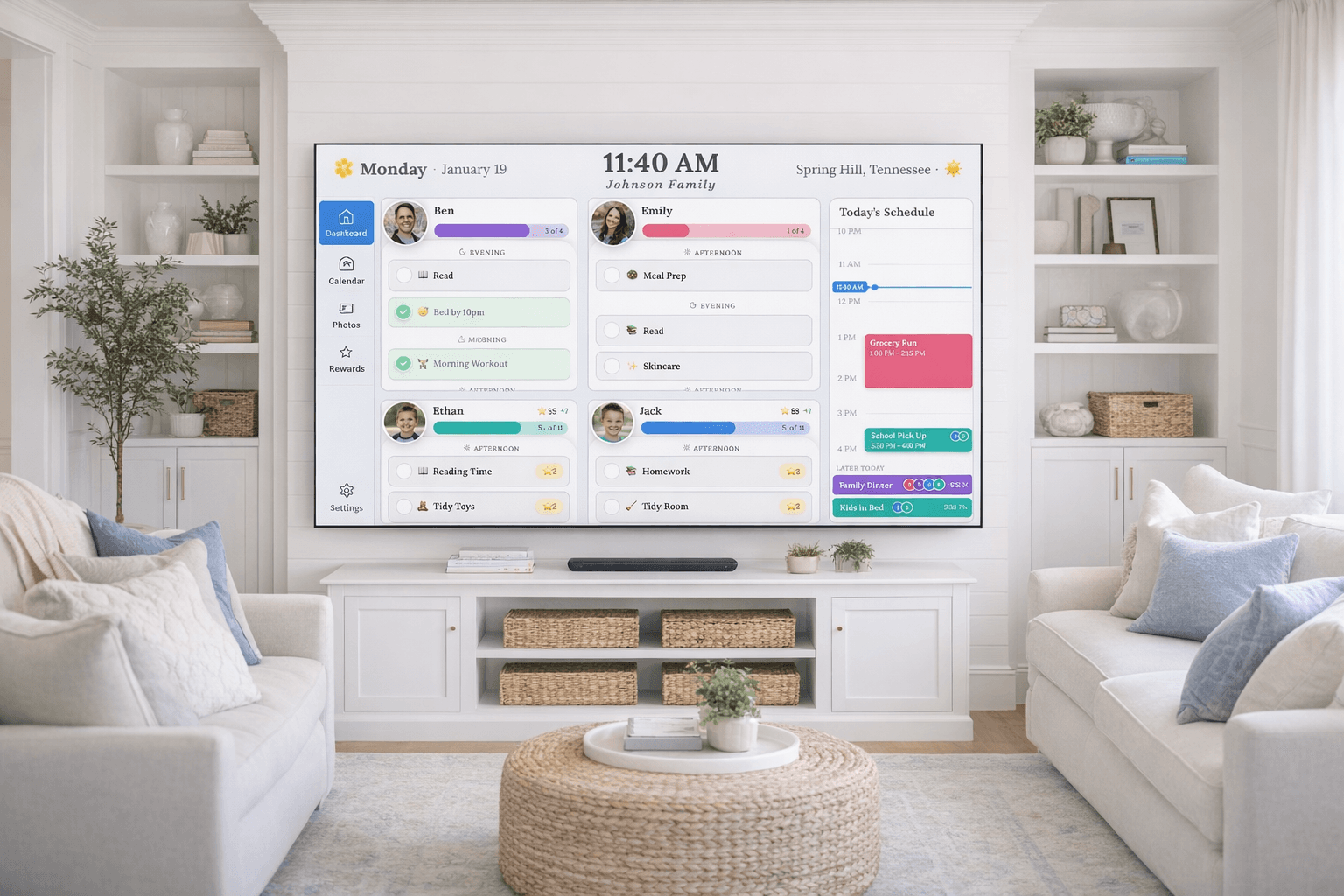
What a digital wall calendar actually is
A screen in a shared spot of the house that shows the family's schedule all day: everyone's events in one view, each person in their own color, updated automatically from the calendars you already keep. The good ones add the things paper never could, like routine checklists kids mark off themselves and chore charts with rewards.
Most products in this category are 10–27 inch touchscreen tablets you buy, mount, and plug in. That's the whole pitch of this page: you probably don't need one, because a wall-sized screen is already hanging in your living room.
Which screen should it live on?
Buy a screen for the job
Skylight ($300–$600 plus $79/yr for Plus) and Hearth ($699 plus ~$86/yr) are polished touchscreens, and budget Amazon-brand tablets sit below them. All of them are a second screen to buy, mount, and power in a room that likely has one.
The DIY wall calendar
An old tablet on the wall or a dashboard cast to a screen. Nearly free if you own the parts, but it's display-only (kids can't use it) and it fights you: timeouts, logouts, and drops are the tax.
Use the TV that's already there
Luana installs from your TV's app store and turns it into the family wall calendar: schedule, routines, chore rewards, and a photo frame when idle. $7.99/mo, nothing to mount.
COMPETITOR PRICES VERIFIED JULY 2026 AND CAN CHANGE · CHECK EACH COMPANY'S SITE
Looking for the “best” digital wall calendar?
If you've decided you want a dedicated touchscreen, the buying guides mostly agree: Skylight makes the most polished device, and our own comparison says so too. But “best” depends on what you're optimizing. Biggest screen, lowest cost, and least clutter all point the same direction: the TV you already own. For the full field, phone apps and hardware displays alike, see our roundup of the best family calendar apps, or how this compares to a digital family calendar more broadly.
What's on the wall
The whole family, one view
Google, Apple, and Outlook calendars synced read-only into one wall-sized view, each person in their own color. Luana displays your events and never edits them.
Checklists kids run themselves
Morning and evening routines kids check off from the remote. The wall answers "what am I supposed to be doing?" so you don’t have to.
Chores with stars attached
A chore chart with star rewards built in: kids earn stars for what they finish and spend them on treats or privileges you set.
A photo wall between glances
When nobody’s interacting, the calendar gives way to your family photos. One press of the remote brings the day back.
Your wall already has a calendar-sized screen on it.
The appeal of a wall calendar is that it's big, shared, and always there. A 43–75 inch TV beats a 15-inch tablet on all three, and yours is already mounted in the room where the family actually gathers. Three steps and it's working:
Wall-calendar questions, answered
What is a digital wall calendar?
A digital wall calendar is a screen in a shared spot of the house that shows the whole family’s schedule all day: everyone’s events in one view, each person in their own color, updating itself from the calendars you already keep. Most products in the category are 10–27 inch touchscreens you buy and mount, like Skylight or Hearth. The alternative is an app like Luana that does the same job on the TV already in your living room.
Do I need to buy a special screen to put a digital calendar on the wall?
No. Dedicated wall calendars are convenient, but they are a second screen: $300 to $699 up front, plus a subscription for the family features. If a TV already hangs where your family gathers, an app can turn it into the wall calendar with nothing new to buy, mount, or plug in.
How do I make a digital wall calendar without buying a device?
Two routes. The DIY route: an old tablet on a stand or a browser tab cast to a screen, which is nearly free but display-only and fragile. The app route: install Luana from your TV’s app store, pair it with a short code, and connect your Google, Apple, or Outlook calendar (read-only). The TV becomes an always-on family calendar with routines and chore rewards, and drifts to your photos when idle. One caveat if you are buying a stick for this: Amazon’s newest Fire TV sticks, the 4K Select and the 2026 Stick HD, run a system screensaver that no app can override, so choose a Fire TV Stick 4K Plus or 4K Max instead.
Where should a digital wall calendar go?
Wherever the family actually passes every day, which is why kitchens and living rooms win. Dedicated displays need an open patch of wall and an outlet there. A TV-based wall calendar skips that decision: the living-room TV is usually already mounted in the highest-traffic room of the house.
What size should a digital wall calendar be?
Big enough to read from across the room. Dedicated calendars run 10–27 inches, which works up close in a kitchen. A TV is 43–75 inches: a month view with every kid’s color is legible from the couch, and a week view is readable from the next room. Size is the quietest advantage of using the screen you already own.
How does the cost compare to Skylight or Hearth?
A Skylight Calendar runs about $300 to $600 depending on size, plus $79/yr for its Plus features; Hearth Display is $699 plus about $86/yr. Luana is $7.99/mo (or $79.99/yr) with a 14-day free trial and no hardware, so a full first year costs less than the cheapest dedicated display’s hardware alone.
Can kids use it, or is it just a display?
With Luana, kids use it from the TV remote: they check off morning and evening routines themselves and earn stars for chores, redeemable for rewards you set. That is the difference between a calendar the family looks at and a system the family runs on.
Put the calendar on the wall you already have.
Try Luana free for 14 days. You can even preview it in your browser before installing anything.
Start your free trial